

Please note, this post may contain affiliate links. Visit Devine Fairytale’s Disclosure Policy for more details.
When planning a trip to Walt Disney World or Disneyland, MagicBand+ is one of the most exciting tools to make your vacation even more magical. Whether you’re wondering about MagicBand Plus features, how to charge it, or if it’s worth the investment, this guide has everything you need to know.

This innovative device stores all of your essential information in one convenient location and serves as a fashion statement with customizable designs. Say goodbye to the hassle of carrying multiple items and hello to a seamless and magical vacation experience.
What can you do with a regular Magic Band?
If you are headed to Disney soon, you might wonder what you can do with a regular MagicBand if you’re not wanting to upgrade to the newer style. Here is a list of everything Magic Bands can do:
- When you get to your hotel room on Disney property, you can unlock your door.
- You can use the MagicBand to scan into the theme parks (as long as you have a valid ticket linked).
- With the MagicBand you scan in to access your Lightning Lane reservations.
- If you want to purchase something, you can charge it to your hotel room, through your MagicBand.
- You can use the MagicBand to access your PhotoPass photos.
What is MagicBand Plus?
MagicBand+ is the next evolution of Disney’s wearable tech, designed to enhance your park experience. It’s more than just a stylish accessory — it’s your park ticket, room key, and even your way to interact with new immersive features in the parks. With updated technology and vibrant Magic Band colors to choose from, MagicBand+ adds convenience and a bit of extra Disney magic to your trip.
MagicBand Plus Features You’ll Love
MagicBand+ brings exciting new features to the table:
- Interactive Experiences: MagicBand+ lights up and vibrates during nighttime spectaculars, like fireworks or projection shows. It’s an immersive way to feel part of the magic.
- Game Play: Hunt for bounties in Star Wars: Galaxy’s Edge or interact with statues during the Disney Fab 50 Quest. These features add a fun layer of exploration to your visit.
- Classic Convenience: Use it to enter the parks, access Lightning Lanes, and link your PhotoPass pictures.
With all these Magic Band Plus features, it’s no surprise they’re a popular choice for Disney guests.

How Much Does MagicBand Plus Cost?
Pricing for MagicBand Plus varies depending on the design. Solid Magic Band colors are typically priced around $34.99, while special designs featuring Disney characters or limited editions may cost closer to $44.99. You can purchase them in advance through your My Disney Experience account with a resort stay or pick one up in the parks or at select Disney resorts.
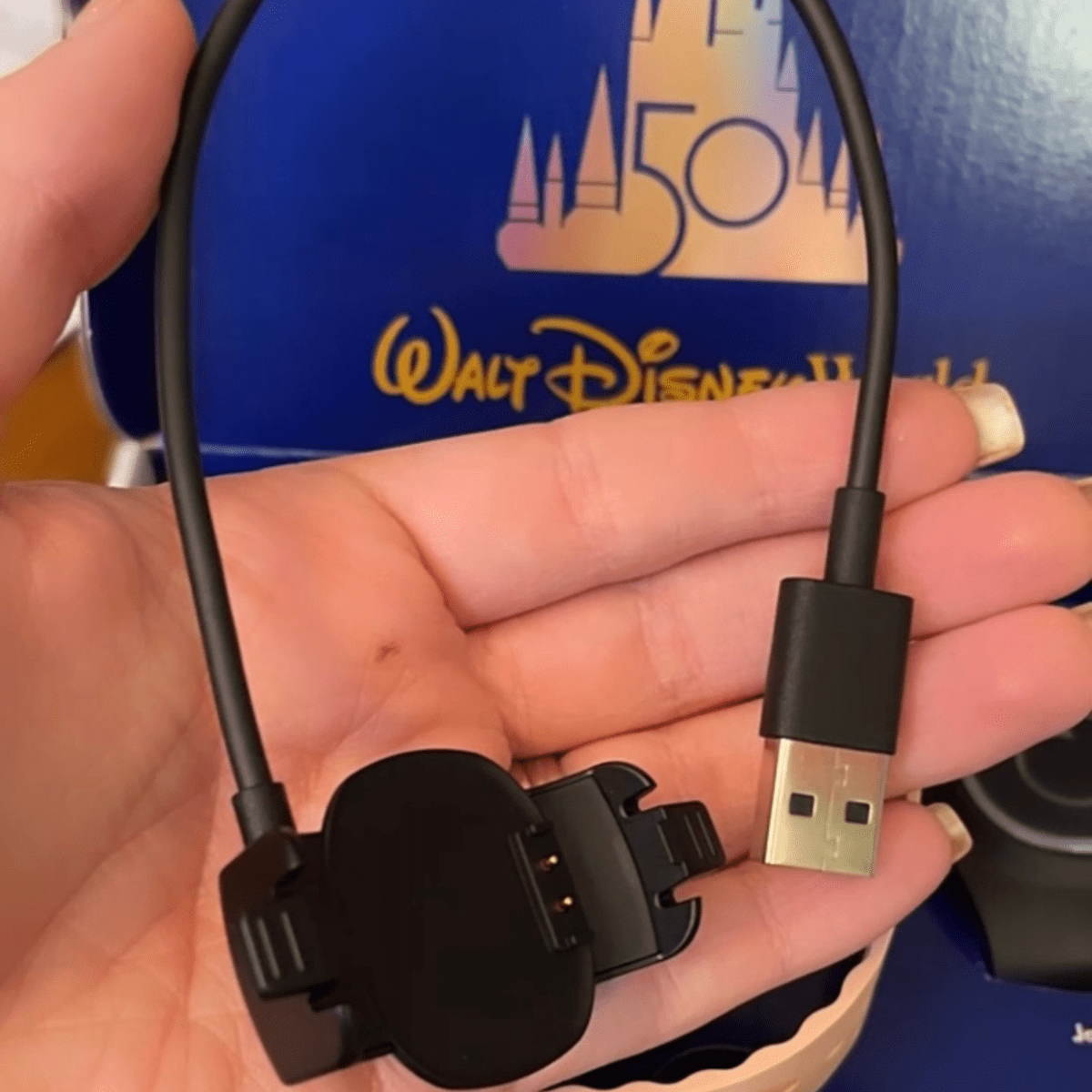
Charging Your MagicBand Plus: What You Need to Know
MagicBand+ includes rechargeable technology, unlike earlier versions. When you receive your MagicBand Plus, you’ll also receive a USB charging cord made especially for your band. Make sure you don’t accidentally throw it away!
How Long to Charge Magic Band Plus?
A full charge takes about 1-2 hours. Plan to charge your MagicBand Plus overnight or during breaks in your day.
How to Tell if MagicBand Plus is Fully Charged?
When charging MagicBand Plus, you’ll see a pulsing light on the band. Once the light stops pulsing and remains solid, it’s fully charged. You can also check the battery status in the My Disney Experience app.
- Flashing Red – means you should charge ASAP
- Flashing Green – indicates a fully charged battery
- Flashing Yellow – means a low battery

Magic Band Plus Charging Tips
- Make sure to fully charge your bands before your trip so they will be ready to go.
- Use the USB charging cable provided with your MagicBand+ – don’t throw them away!
- Charge your MagicBand Plus each evening in your hotel room to get the most use out of the fun, extra features!
- If you have several people in your travel party, a USB charging port with multiple inputs is a huge help when charging your Magic Bands and other electronics in your resort room.
- Don’t forget to pack a portable charger if you’re planning a long day in the parks.
Note: If the battery in your MagicBand Plus dies, all of the basic features will still work you will just miss out on the interactions and lights.
Looking for the best travel essentials or Disney-inspired finds? I’ve rounded up all my favorites on Amazon, from park must-haves to magical extras. Take a peek and snag some goodies for your next vacation!
How to Link MagicBand Plus in the My Disney Experience App
You will need to link your Magic Bands to your My Disney Experience account and install the update before you can use your new band. Here’s the process to get everything set up:
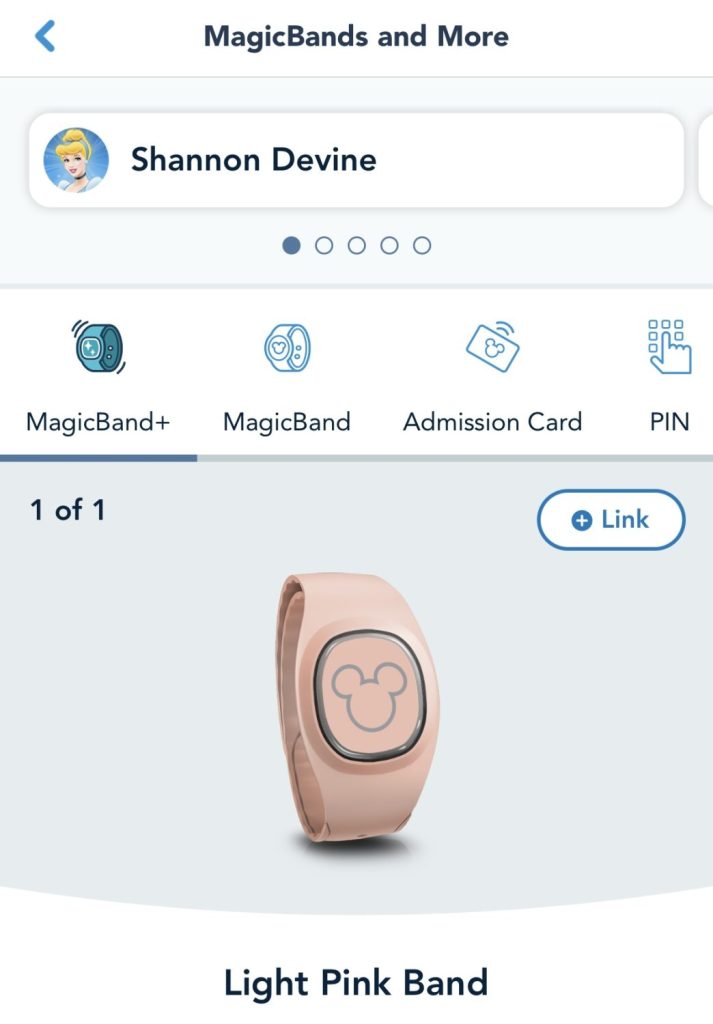
- Turn on your MagicBand Plus by pressing the button on the back (hold for 3 seconds and then release).
- Log in to the My Disney Experience app.
- Tap the three lines at the bottom right corner. Scroll until you see the box that says “MagicBands and More.”
- Click on the name of the person you want to link the MagicBand + to.
- Click on the “Link” button.
- Select “Tap” at the top and then click the blue button that says “Open Scanner to Link.”
- Make sure you are assigning the Magic Band Plus to the correct person. Once a band has been linked to someone, it cannot be linked to someone else.
- Hold your band close to your phone.
- Make sure that you get to the screen that shows the Bluetooth pairing is complete.
- You’ll see a screen that shows the final step and a button to click to “Update This MagicBand+.” Note: If you need to install an update, you’ll get a message letting you know the band requires 60% or more battery power to complete a software update.
- Download and install the update.
- You are able to customize some features of the Magic Band Plus after everything is set up. You can choose a custom light up theme and adjust the vibration and recognition settings.
Planning a Disney vacation can feel like a full-time job—trust me, I get it! As your travel agent, I’ll take care of the details, so you can focus on the fun stuff (like deciding which snack to try first). Let’s plan that vacation you’ve been dreaming of!
Pro Tips for Using MagicBand Plus in the Parks
To get the most out of your MagicBand Plus experience, keep these tips in mind:
- Sync Before You Go: Ensure your MagicBand+ is fully charged and synced to your My Disney Experience account before entering the parks.
- Plan for Interactive Activities: Make time for experiences like the Star Wars: Galaxy’s Edge bounty hunting or the Disney Fab 50 Quest to enjoy the interactive features fully.
- Monitor Battery Life: Use the app to check your MagicBand+ battery status throughout the day. If you’re spending a full day in the parks, bring a portable charger to avoid running out of battery.
- Customize Your Band: Consider decorating your MagicBand+ with band covers or charms available at Disney shops for a personal touch.

Magic Band Colors and Designs
One of the fun parts of choosing a MagicBand+ is the variety of colors and designs. Whether you prefer classic solid colors or intricate designs featuring beloved Disney characters, there’s a MagicBand+ for every style. New designs are frequently released, so keep an eye out for limited editions and seasonal themes.
FAQ: Your MagicBand Plus Questions Answered
Got questions about MagicBand Plus? You’re not alone! Here, we’ve rounded up the most common questions to help you make the most of this handy Disney accessory.
Are Magic Bands Worth It?
This is a question many Disney guests ask. While MagicBands are not required to enjoy the parks, MagicBand Plus can add convenience and fun to your trip. It keeps your hands free while managing park tickets, Lightning Lanes, and room access. The added immersion during shows and games makes it feel more magical and with so many Magic Band colors and designs, you can find one that matches your style or favorite character.
Whether Magic Bands are worth it depends on your priorities. If you value ease of access and love interactive features, MagicBand Plus is a great investment.
How Long Does MagicBand Plus Battery Last?
A fully charged MagicBand+ typically lasts 1-3 days, depending on usage. For interactive features, frequent charging might be needed.
Can I Use MagicBand+ Without Charging?
Yes, you can still use it for basic functions like park entry and Lightning Lanes without charging. However, the interactive features require a charge.
How Do I Replace the Charging Cable?
If you lose your charging cable, replacements are available at Disney parks, resorts, and online through ShopDisney.
Can I Share My MagicBand+ With Someone Else?
No, MagicBands are linked to your personal My Disney Experience account and cannot be transferred once activated.
Do I Need a MagicBand Plus for Each Person in My Group?
Each guest will need their own MagicBand+ for personal use. However, they’re not required; you can still use the app or physical tickets if you prefer.
How Durable is MagicBand+?
MagicBand+ is designed to withstand typical wear and tear, including water resistance for use in pools and on water rides. However, avoid exposing it to extreme conditions to ensure its longevity.
Can Magic Band Plus Get Wet?
Yes, MagicBand Plus is water-resistant and can withstand splashes and brief immersion in water. However, removing the band before swimming or taking a shower is recommended to prolong its lifespan.
Are Magic Bands Necessary?
No, they are not! It’s just an extra accessory that makes Disney a little bit more convenient and interactive. You will use a plastic card, called a Key to the World card, or your physical park ticket to scan into your hotel room, the theme parks, or rides. You also have the option to set up Magic Mobile to use with your Apple Watch.
Does Everyone Get a Magic Band?
Disney used to give everyone a free MagicBand with the purchase of their Disney resort stay but this is no longer the case. You will need to purchase one if you want to use it during your trip.
How Much Does MagicBand+ Cost?
The prices vary based on the different Magic Band colors and designs available. Solid colors will be the least expensive and special designs or limited editions will be more. You can expect to pay somewhere between $35 – $55 dollars for one Magic Band Plus.
If you are staying at a Disney resort, you will get a discount on your Magic Band order when you are logged into your My Disney Experience account and your resort reservation is linked.
Can You Use Magic Band Plus at Disneyland?
Yes, finally! Previous versions of the Magic Bands have only been able to be used at Walt Disney World in Florida. The new MagicBand+ can be used at Disneyland in California. You will be able to use your band to enter the Disneyland theme parks, access your Lightning Lane rides, link PhotoPass images, and interact with the fireworks shows, statues, and interactive games.
Feeling overwhelmed by Walt Disney World? Don’t worry, I’ve got your back! My 10-day email series, Walt Disney World Quick Start Guide, will walk you through everything you need to know to plan an unforgettable trip. Sign up now!
MagicBand + on Disney Cruise Line
Disney Cruise Line has started a slow rollout for eligible guests on select sailings of the Disney Wish and the Disney Fantasy of the DisneyBand+ (same Magic Band +, just a different name on the Disney Cruise Line). Over time, more ships and sailings will have this option.
You will be able to make your port arrival experience easier, unlock your stateroom door, charge additional food and beverage items not included in your cruise fare, use in the kid’s clubs instead of the Oceaneer Club band, link onboard photographs, and interact in ways similar to Disney World and Disneyland.

Conclusion: Is MagicBand+ Right for You?
MagicBand+ is a fantastic addition for anyone looking to enhance their Disney trip with convenience and a touch of magic. From its interactive features to the variety of Magic Band colors, there’s something for everyone. If you’re all about convenience and creating memorable moments, then yes, Magic Bands are worth it. Happy travels and may your next Disney adventure be as magical as ever!

Read More:
- How to Use the My Disney Experience App
- Movies to Watch Before Your Disney Vacation
- Walt Disney World Resort Categories
- Your Disney World Vacation Planning Timeline
- Ultimate Disney Packing List

What is a Magic Band at Walt Disney World?
[…] new Magic Band Plus was released during the summer of 2022. Find out more about the fun […]
Jen W
Thank you the detailed instructions on setting up our Magic Bands!! Your directions were perfect and much better than the directions on the actual Disney app!! I really thought my bands were defective until I found you blog!! I greatly appreciate you!!
Devine Fairytale
Jen WGlad it was helpful!